NANOG: online knowledge repository for IT professionals
In a previous post I listed and described various organizations which are considered highly influential and authoritative across the wide field of information technology. These organizations are deeply involved in setting standards and best practices for nearly all facets of modern computing. One group which I neglected to include (but should have) is the North American Network Operators’ Group, or NANOG. Founded in 1994, NANOG describes itself as a “professional association for Internet engineering and architecture. Our core focus is on the technologies and systems that make the Internet function: core routing and switching; Internet inter-domain routing; the domain name system; peering and interconnection; and Internet core security. We also cover associated areas…such as data centers and optical networking.”
Although not a standards-setting body, NANOG provides a platform for knowledge exchange and professional networking opportunities in the form of their triannual meetings. These events serve as venues for some of the top minds in the industry to detail the findings of their research and to present the lessons learned from their real world work experiences. Recordings of the presentations are uploaded to the NANOG website and can be downloaded for free. This content serves as a fantastic educational resource for IT professionals who are seeking to keep their subject matter expertise sharp and relevant.

Thwart online snooping with VyprVPN
VyprVPN for Android, Mac OS X, Apple iOS, and Windows revs up your digital privacy.
A virtual private network (VPN) creates a secure network connection over a network you don’t fully trust, such as the Internet. By creating secure tunnels between endpoints, VPNs are a way of disguising (encrypting) your data traffic so that third parties (such as hackers, ISPs, and state-sponsored authorities) cannot see your true source IP address or the content of your online activities.
Many businesses, government agencies, and educational institutions use VPN technology to enable remote access for their users. With VPNs these users can securely connect to their work networks from their homes, airports, hotels, etc. What if you could connect not just to one destination, but to the whole Internet in such a way? After all, in light of the recent flood of revelations in regard to online spying committed by various facets of the American government (and by foreign states as well), all Internet users have a valid reason to increase their level of online privacy. VyprVPN by Golden Frog, a global online service provider, is an easy and highly effective way to do so.

OSSEC, the free and open source IDS
Intrusion detection software is meant to monitor network traffic or host activities for malicious actions, such as successful or unsuccessful intrusion attempts, hostile traffic (i.e., malicious scans and denials of service), unauthorized configuration changes, malware symptoms, and user policy violations. An intrusion detection system (IDS) typically can produce reports describing the details of the potentially hazardous activity which generated alerts. OSSEC is particularly useful in this context for many reasons. First, it is an established, reputable product with a proven track record (OSSEC was first released in 2004 and has been owned by Trend Micro since 2009). Second, it is free and open source. Third, it is compatible with most modern operating systems such as Linux, Windows (Server 2008, Server 2003, 7, Vista, XP, 2000) BSD (Free/Open/Net), Unix (Solaris, HP-UX, AIX), and MacOS.
One of the key tenets of IT security is to keep intruders from gaining access to your organization’s network. Not only must the network’s edge be hardened to resist a myriad of attacks, but measures must be put into place to detect attackers who have successfully breached the perimeter. These two measures are important steps in achieving a “defense in depth” security posture, and OSSEC is an effective and affordable option to fulfill the IDS role.

Intrusion detection systems (IDS) are generally classified as either network-based or host-based in nature. A network-based IDS (NIDS) attempts to discover unauthorized access to a network by analyzing traffic as it flows between nodes for signs of malicious activity. A host-based IDS (HIDS), on the other hand, is designed to detect threats occurring on the hosts where they are installed (on servers, for example). A HIDS monitors local actions and attempts to identify those which could be hazardous. In this way a HIDS is similar to antivirus applications that identify and block certain attack patterns and raise alarms to alert users and administrators.
Perform Web-based network queries with these sites
When you want to perform network queries for troubleshooting or data collecting purposes, the standard approach has been to launch a non-graphical command line interface (CLI) in Windows or a shell prompt (such as Bash) in Linux to display the input and output of the commands you use. While this practice is undoubtedly quick and lightweight, the functionality of many networking commands has been replicated on dozens of websites which allow network administrators the same capabilities in graphical, web-based environments.
Nearly all of the networking-related command utilities have been listed and described in this blog. Some of these commands include netstat, nslookup, ping, traceroute, and whois among others. This post will show you the best and most popular websites for using these types of commands in browser-based graphical user interfaces (GUIs). These websites will be listed in alphabetical order based on domain name.
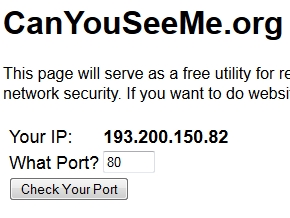
Can You See Me
CanYouSeeMe.org issues probes to see if certain ports on your external IP address respond.
Using TrueCrypt on Linux and Windows
Update 2: TrueCrypt audit results released (PDF)
Update: the TrueCrypt project unexpectedly shut down on 28 May 2014. A mirrored copy of TrueCrypt.org is available on Andryou.com. The home page of the next incarnation of TrueCrypt is TrueCrypt.ch.
After numerous revelations this year of the National Security Agency’s (NSA) frightening capabilities of mass spying on phone calls and Internet traffic (see, for example, PRISM), there has been a renewed interest in online privacy and the securing of our electronic data communications, such as Web and email activity. More and more Internet users are looking for solutions to keep their files, emails, and Web searches private. Help is not far off: one of the most effective ways to foil surveillance is by using encryption to make your data unreadable by other parties.
Data can be encrypted in two states – when it is in transmission through a communications network, or when it is at rest (i.e., stored on some sort of storage medium, such as a computer hard drive like the internal drive of your PC or an external USB flash drive). This blog has already covered SSH, RetroShare, and the Tor network as options for securing data in transit. Now we will look at TrueCrypt, perhaps the most popular solution for encrypting data at rest. This article will explain how TrueCrypt works and how you can utilize it on the two most popular operating systems, Microsoft Windows and Linux.

Increase online privacy with RetroShare
In a previous article I described how to significantly increase your online privacy with the Tor service. RetroShare is another option for Internet users who are concerned with staying anonymous online. RetroShare is an application that lets you create private, secure network connections (based on 2048-bit RSA-encrypted SSL) with trusted individuals of your choice (a peer-to-peer network known as “Friend-2-Friend”, or F2F). Unlike some other P2P file sharing services like BitTorrent and Limewire/Frostwire which do not let you selectively share your files with certain users, RetroShare’s F2F functionality allows you to transfer files only with those users to whom you have given your explicit approval.
Once your computer establishes the decentralized F2F connection with your contacts, you can share files, send messages and chat, talk over VoIP, post and read messages in forums, etc. RetroShare not only fully encrypts all communications, it also provides reliable identification and authentication of your trusted contacts so you can be relatively sure that the other users participating in the F2F network are who they claim to be. RetroShare has the potential to be a completely independent social media venue where users’ private data and files are safe from advertisers, marketers, and other entities (i.e., Facebook, Google) looking to harvest personal information for profit, as well as entities engaging in surveillance and censorship. How safe is your online activity using RetroShare? As stated before, it uses SSL tunnels based on RSA 2048-bit encryption. To get an idea of how hard it would be to crack, this YouTube video should explain it.
Using RetroShare
Luckily, RetroShare is available for many different operating systems (Windows, Mac OSX, Linux, etc.). It is built on top of some very reputable and robust software libraries: GNU Privacy Guard/GPGME and OpenSSL.
After you download, install, and launch RetroShare you will first be prompted to create your RetroShare identity.
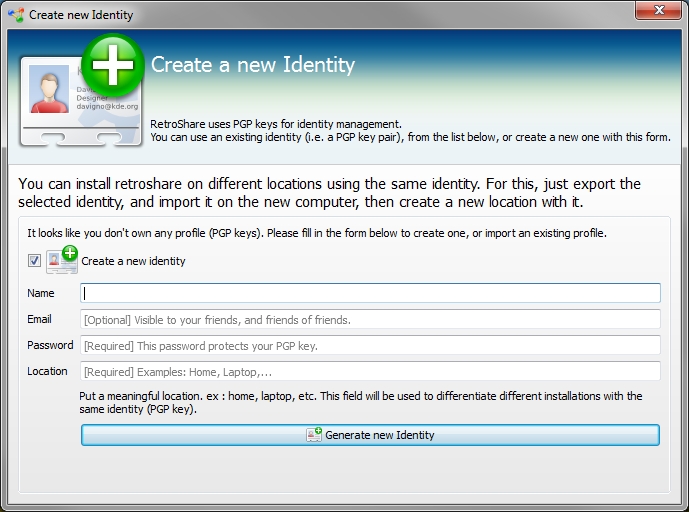
Then you will see the main graphical user interface (GUI) as shown below.





 Doug Vitale Tech Blog
Password-based authentication doomed by inherent flaws
The password-based authentication model is plagued by weaknesses in theory and, as demonstrated by countless hacked accounts, in practice as well. The time for ubiquitous two-factor authentication and password managers is now.
Authentication in computing – the process by which the identity of users is verified – has long relied on passwords as the primary (and often the only) mechanism for account holders to identify themselves. Even the most casual computer users are familiar with the process: when you power on your device or visit certain websites, you often need to enter credentials (i.e., usernames and passwords) to access your files and utilize your account capabilities, and you assume that you are the only one who knows your passwords. In an ideal world, knowledge of passwords would be restricted to the rightful account holders and therefore the entry of valid credentials would be assumed to verify the identity of the user in question. As such, this authentication model seems simple and reliable enough. However, thousands of individuals have had their money and identities stolen, credit cards used, private files accessed, and private emails viewed because the reliability of password authentication failed them. We are going to examine why the practice of logging in to computers and websites with passwords is prone to violation, how these weaknesses are exploited, and what can be done to lower the risks facing our user accounts.
Read the rest of this entry »
Share this on:
Written by Doug Vitale
September 3, 2014 at 1:06 AM
Posted in Commentary
Tagged with authentication, common passwords, credentials, passwords, popular passwords